What leaves your site, and when
SadAnalytics contacts four outside services: Stripe, freecurrencyapi.com, Sentry and Freemius. It never sends them the billing and customer records it stores. Everything else it does stays inside your own WordPress database.
Every outside service, at a glance
| Where | When | What |
|---|---|---|
| Stripe (your payment provider) | When you connect or test the key, and on every sync (scheduled or manual). | Read-only requests for your customers, subscriptions, charges, invoices, products and prices, with the key you enter. Nothing is ever written back to Stripe. |
| freecurrencyapi.com (exchange rates) | Only if your site bills in more than one currency and you save a freecurrencyapi.com key in Settings. It asks when you save the key, and after a sync once the stored rates are a day old. If a request fails, SadAnalytics waits an hour before it tries again, or a day if the key was rejected. | Your key (in a request header) and your main currency code. The reply is exchange rates. |
| Sentry (error reports) | Off by default. Only after you turn on Send error reports to the developer in Settings, Diagnostics, and only when an error happens inside the plugin. | The error message, where in the plugin it happened, what the plugin was doing, and the plugin and PHP versions. A report can quote an ID from your payment provider. Email addresses, Stripe secret keys, your Stripe account ID and your server's WordPress and plugin folder paths are removed from its text, and fields named for personal details or secrets are blanked, before it's sent. |
| Freemius (opt-in, and SadAnalytics Pro licensing once Pro is out) | Nothing is sent unless you click Allow & Continue on the opt-in screen SadAnalytics shows after activation. | Your site's web address and title, WordPress and PHP versions and language, SadAnalytics' version and whether it's active, your WordPress user's name and email, and, unless you untick it on that screen, the list of your plugins and themes. Never your billing data. |
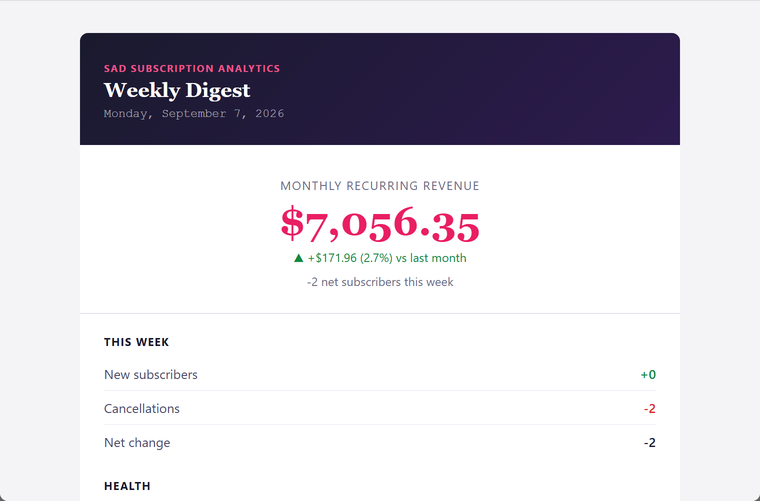
| The weekly digest email | On the day and hour you choose in Settings, Email Digest. Off until you turn it on. | Sent through your own site's outgoing mail to the addresses you list, not to me. It holds your MRR and how it compares with last month, this week's new subscribers and cancellations, churn, ARPU and retention. |
Requests to freecurrencyapi.com, Sentry and Freemius also carry your site's web address, which WordPress and the Freemius code add by default. My own privacy policy says the same.
Stripe: read-only
SadAnalytics only lists and reads data from Stripe; it never creates, updates or deletes anything there. A restricted key with read access to Customers, Subscriptions, Charges, Invoices and Prices is enough. Products read is optional; it gives plan names.
Exchange rates from freecurrencyapi.com
This only happens if your site bills in more than one currency and you save a free key from freecurrencyapi.com in Settings, General. SadAnalytics asks for exchange rates when you save a new key, and after a sync once the stored rates are a day old. Only your main currency code and your key are sent; no customer data leaves for this call. If a request fails, SadAnalytics waits an hour before it tries again, or a day if the key was rejected.
Opt-in error reports
Error reporting is off by default. Turn it on in Settings, Diagnostics with Send error reports to the developer. While it is on, SadAnalytics sends a report to my error tracker (Sentry) when an error happens inside the plugin: the error message, where in the plugin it happened, what the plugin was doing, and the plugin and PHP versions. A report can quote an ID from your payment provider, such as a customer or subscription ID.
The weekly digest email
The weekly digest is off by default. Once you turn it on and add at least one recipient address, it goes out through your own site's mail, on the day and hour you choose, to the addresses you listed and nobody else.
The Freemius opt-in
Right after activation, SadAnalytics shows an opt-in screen headed "Thanks for installing Sad Subscription Analytics". Nothing is sent unless you click Allow & Continue. If you opt in, Freemius receives your site's web address and title, WordPress and PHP versions and language, SadAnalytics' version and whether it's active, your WordPress user's name and email, and, unless you untick it on that screen, the list of your plugins and themes. It never receives your billing data. Once SadAnalytics Pro is out, Freemius also handles its licenses.
You can click Skip instead, and SadAnalytics works the same. If you opted in, you can pause sharing with the Opt Out link under Sad Subscription Analytics on the Plugins page, or disconnect the site from your account page, which Settings, Diagnostics links to.