Settings: General
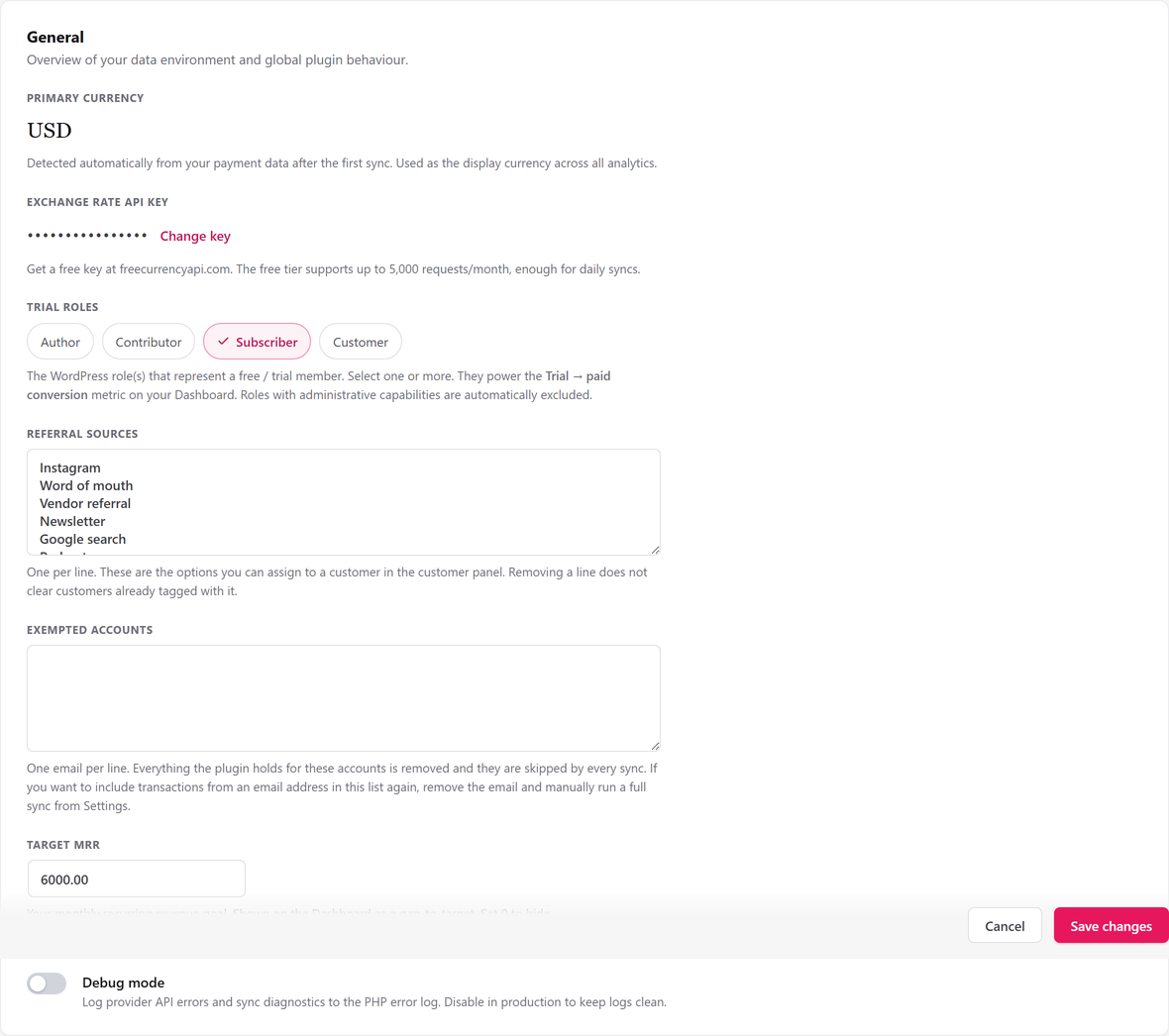
The General tab is the default panel of the Settings screen. It shows the currency SadAnalytics detected, an optional exchange-rate key, who counts as a trial member, the referral sources you can tag customers with, accounts to exclude entirely, your revenue target, and a debug switch.
Where to find it
Go to Settings in the SadAnalytics menu. General is the first tab in the sub-navigation and the one that opens when no other tab is chosen, at admin.php?page=sad-subscription-analytics-settings. Only administrators can open Settings. (View-only access for other people comes with SadAnalytics Pro, which is coming soon; see Access control.)
General fields
One card, headed General, holds every field below, in this order.
| Field | What it does | Default |
|---|---|---|
| Primary currency | A read-only display of the currency SadAnalytics found in your synced data. It is not an input; there is no way to change it from this screen. On screen: "Detected automatically from your payment data after the first sync. Used as the display currency across all analytics." None. The value is written by the sync itself (majority currency across your payments, falling back to subscriptions), not by anything typed here. | Reads 'Not yet detected. Run a sync first.' before the first sync finds any payment data. |
| Exchange rate API key | A key from freecurrencyapi.com that lets SadAnalytics convert secondary currencies into your primary currency for one combined MRR total. The whole field is hidden unless SadAnalytics has detected more than one currency in your data. On screen: "Get a free key at freecurrencyapi.com. The free tier supports up to 5,000 requests/month, enough for daily syncs." Sanitized and encrypted (AES-256-GCM) before storage. Leaving the field blank on save keeps whatever key is already stored. | Empty. Once a key is stored it is shown masked with a Change key button; the real value never comes back to the browser. |
| Trial roles | The WordPress role or roles that identify a free or trial member on your site, shown as a row of checkbox chips. These roles feed the Trial to paid conversion figure. On screen: "The WordPress role(s) that represent a free / trial member. Select one or more. They power the Trial → paid conversion metric on your Dashboard. Roles with administrative capabilities are automatically excluded." Only roles with no administrative capabilities (manage_options, edit_users and similar) are offered at all. You may select several, or none. | Subscriber, selected on activation. |
| Referral sources | The list of sources you can assign to a customer from the customer drawer, one per line in a textarea. On screen: "One per line. These are the options you can assign to a customer in the customer panel. Removing a line does not clear customers already tagged with it." Blank lines are dropped, each entry is capped at 100 characters, duplicates (case-insensitive) are removed keeping the first spelling, and the list is capped at 50 entries. | Instagram, Word of mouth, Vendor referral, Newsletter, Google search. |
| Exempted accounts | Email addresses whose data SadAnalytics deletes entirely and refuses to import again, one per line in a textarea. On screen: "One email per line. Everything the plugin holds for these accounts is removed and they are skipped by every sync. If you want to include transactions from an email address in this list again, remove the email and manually run a full sync from Settings. If any line is not a valid email address, clicking Save changes saves nothing until you fix it." Each line must be a real email address 254 characters or fewer; one bad line rejects the whole save. Duplicates are dropped and the list is capped at 200 entries. | Empty. |
| Target MRR | Your monthly recurring revenue goal, entered in major units of your primary currency (for example 1500.00). The Dashboard shows it as a gap-to-target line under the MRR figure. On screen: "Your monthly recurring revenue goal. Shown on the Dashboard as a gap-to-target. Set 0 to hide." Digits with an optional decimal point and thousands commas; a value the parser cannot read is rejected rather than silently zeroed. An empty field means 0, which clears the target. | 0.00, which is treated as unset. |
| Debug mode | A toggle that writes SadAnalytics' internal diagnostic lines (provider errors, sync scheduling problems and similar) to the server's PHP error log, each prefixed '[SadAnalytics] '. On screen: "Log provider API errors and sync diagnostics to the PHP error log. Disable in production to keep logs clean." Boolean. Has no effect on the Diagnostics error table below, which records regardless of this switch, and no effect on the separate opt-in error-reporting toggle covered on the Diagnostics page. | Off. |
What saving does
The General tab shares one sticky Save changes bar with every other Settings tab. It compares every field against a snapshot taken when the page loaded and posts only the ones you changed, so an edit on one tab never touches settings you have not looked at. Referral sources and Exempted accounts are stored in their own options rather than inside the main settings, but the same Save changes click writes both.
If Trial roles changed, unticking every chip is saved as an explicit empty list rather than being ignored. If Exchange rate API key cannot be encrypted (WordPress's security keys are missing from wp-config.php), the whole save is refused so nothing is left half-written.
When the purge actually removes at least one customer, SadAnalytics also queues a metrics recalculation for every connected source so your reports catch up.