Upcoming Payments
In SadAnalytics Pro, Upcoming Payments will be the chase list for renewals that need a human to collect them. This page describes how it works, so you know what to expect.
What it lists
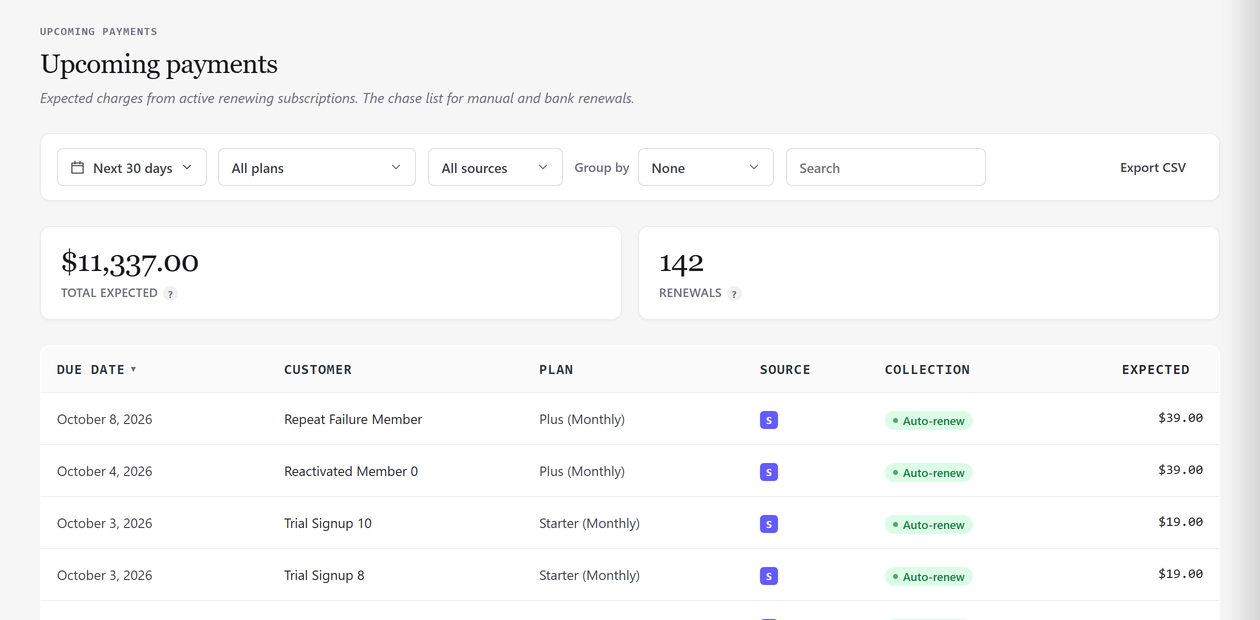
The report lists expected charges from every active, renewing subscription across every connected source, combined into one list. It looks forward rather than back: choose Next 7 days, Next 30 days (the default), Next 90 days, or a custom window.
Filtering and grouping
Filter by Plan or by Source, the connected providers such as Stripe or PMPro Offline. Group rows by Due week, Due month, or Plan / product.
Overdue renewals
A renewal whose expected date has already passed still appears, shown in bold red, so a late but still-active renewal is never hidden just because it falls before the window you chose. This makes the list a chase list rather than a strict forecast.
The collection badge
Every row carries a Collection badge: Auto-renew for a subscription a payment processor collects automatically (Stripe, by default), or Manual for anything you or a connector have to chase yourself, including PMPro Offline and Manual subscriptions.
Marking a renewal paid
Upcoming Payments has no Mark paid button. To confirm a manual renewal, open Manual Payments: a due subscription there has Mark paid, which records the payment and moves the renewal on by one interval.