Dashboard, every card
The Dashboard is the first page SadAnalytics opens after activation. It reads pre-calculated figures written at the end of each sync, plus a few live bands driven by a shared Period and Compare to control.
Header: sync status
Every SadAnalytics page opens with the same header: the brand mark, the product name, the version number, and a Sync status pill. The pill is server-rendered with a state class, then JavaScript replaces its text on load.
| Pill state | What it reads |
|---|---|
| Never synced | No sync job has ever run. |
| Syncing… | A sync is currently fetching data. |
| Processing… | Data fetched; the post-sync stages (detect, link, metrics, cohorts, history, match) are running. |
| Synced | The last sync finished, shown in the site timezone, e.g. "May 7 · 3:42 PM". |
| Last sync failed | The last sync ended in an error. |
| Sync cancelled | The last sync was cancelled. |
After your first sync, a Your first sync is complete panel appears under the page title. If SadAnalytics finds activity that SadAnalytics Pro (coming soon) would import or manage, such as offline Paid Memberships Pro payments or upcoming renewals, it lists each one with a "See what Pro adds" link. Otherwise it says there is nothing else to import. The panel stays until you click Dismiss.
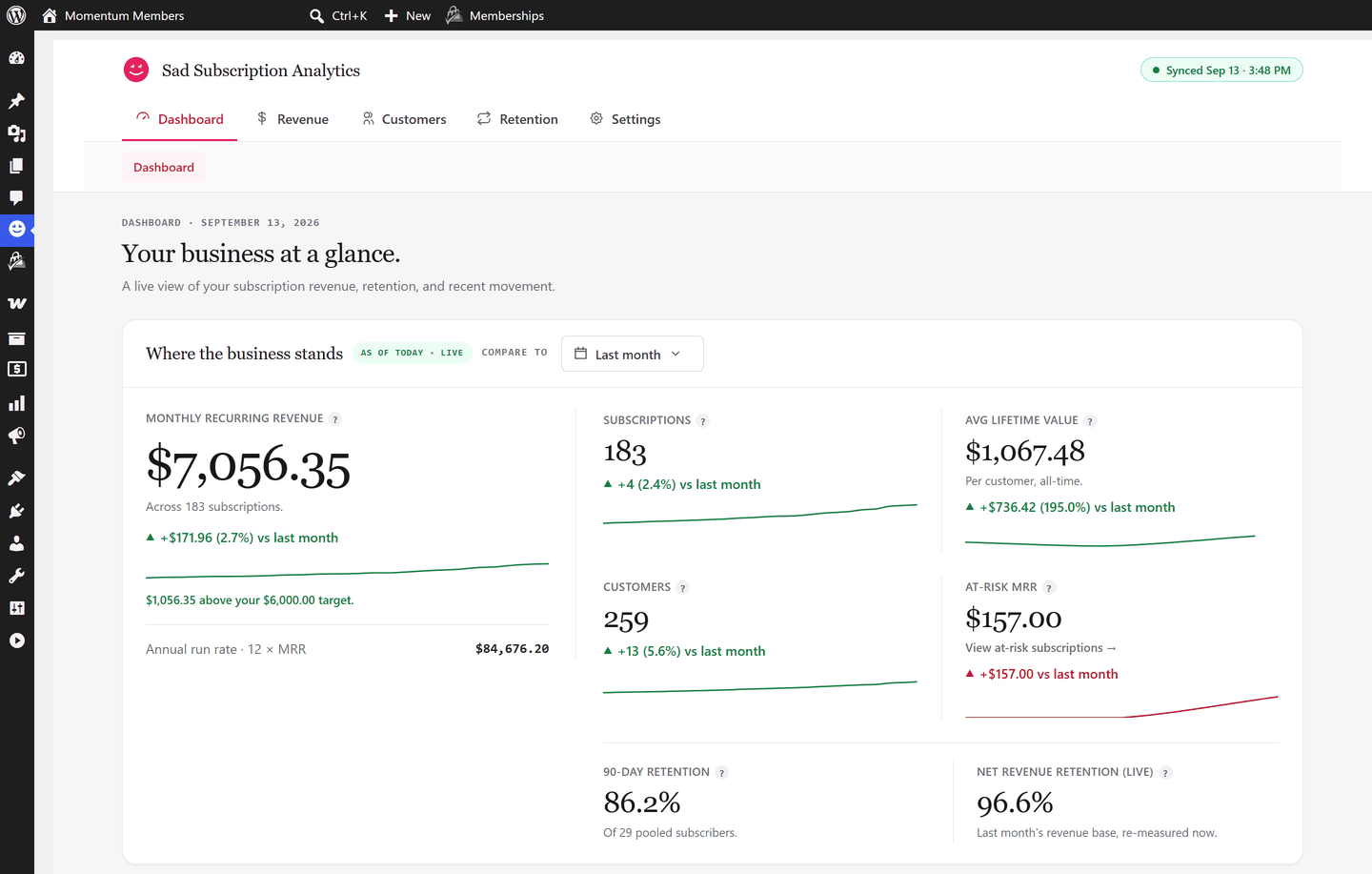
Where the business stands
The hero band is titled Where the business stands and tagged with today's date, for example "As of Oct 19, 2026 · Live". Its figures come from the metrics stored at the last sync, so no control on the page changes them. Only the change under each card, the sparklines, and the month shown beside Compare to follow the Compare to picker.
| Card | What it shows | How it is computed |
|---|---|---|
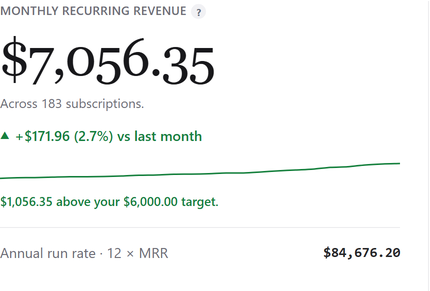
| Monthly recurring revenue (MRR) | "Monthly recurring revenue: the predictable revenue your active subscriptions bill each month. One-off and lifetime payments are not included." | Adds up the monthly amount of every subscription that is active or past due, plus trialing subscriptions whose current period is paid. Converted to the primary currency; subscriptions in a currency with no exchange rate are left out, and a notice says how many. Links to the Subscriptions report showing active, trialing and past due subscriptions. |
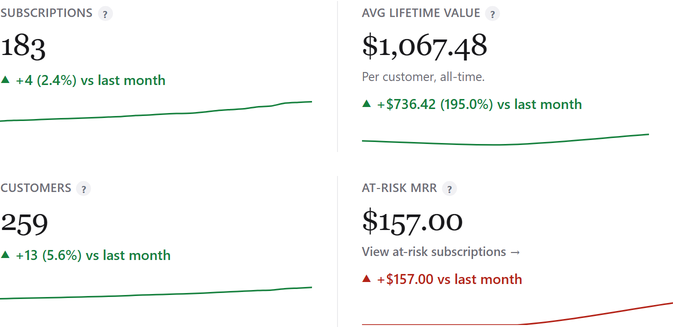
| Subscriptions | "Subscriptions that are currently active, trialing, or past due. Paused and cancelled subscriptions are excluded." | Count of subscriptions that are active, trialing or past due, across all active providers. Links to the same Subscriptions report view as MRR. |
| Avg lifetime value (LTV) | "Average lifetime value: the total revenue a typical customer brings in over their whole relationship with you." Shown as an em dash with "Needs more closed history." when it cannot be computed yet. | Per-provider ARPU divided by the trailing-30-day all-source churn rate, combined across providers as a weighted average. ARPU = MRR divided by paying subscribers. |
| Customers | "Everyone who has ever paid you at least once, whatever their current status." | The customer count stored at the last sync: customers of active providers with at least one subscription or one payment. Links to the Customers report over all time. |
| At-risk MRR | "Monthly recurring revenue from subscriptions whose payment has failed and has not yet been recovered." | Adds up the monthly amount of every past due or unpaid subscription, converted to the primary currency. Links to the Subscriptions report with Past due and Unpaid ticked. A fall shows as good news. |
| 90-day retention | "Of the customers who signed up, the share still subscribed 90 days later. Comes from the cohort engine, so the period control does not change it." | Pooled retained-over-starting subscribers for cohorts that have reached month 3, pooled newest-first until at least 3 mature cohorts and 20 subscribers are reached (up to 24 months back). Shown as an em dash with a reason ("Fewer than 3 measurable cohorts yet." or "Sample too small…") when not yet available. |
| Net revenue retention (live) | "Live net revenue retention: last month's revenue base re-measured today (renewals kept, churn removed, upgrades/downgrades applied), divided by that base's starting MRR. Excludes brand-new customers, so it isolates retention of existing revenue." | MRR that contributed at the end of last month, re-measured now, divided by last month-end MRR of that same base. Shown as an em dash with "Needs a prior month of history." until a prior month exists. |
| Annual run rate (ARR) | A footer line, not a card: "Annual run rate · 12 × MRR". | The stored ARR (MRR × 12), or MRR × 12 worked out on the spot when none is stored. Links to the Revenue and MRR report. |
When two or more active providers each contribute MRR, a per-source list appears under the target row (source name, subscription count, MRR), sorted MRR descending. On a Stripe-only free install this list never renders.

The "Compare to" picker
The hero comparison is always month by month: the current calendar month against an earlier month. It changes only the change figure and sparkline under each hero card, and the month shown beside the picker; the headline figures themselves stay the same.
| Field | What it does |
|---|---|
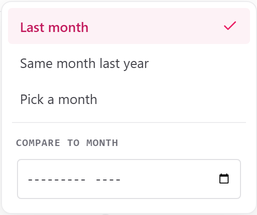
| Last month | Compares the current month to the immediately preceding calendar month. The default choice. On screen: "Last month" |
| Same month last year | Compares the current month to the same calendar month one year earlier. On screen: "Same month last year" |
| Pick a month | Opens a "Compare to month" month input. Choosing a month takes effect at once (there is no Apply button) and relabels the picker with that month. On screen: "Pick a month" |
The changes under the cards have no caption of their own. The month you are comparing with (for example "Sep 2026") shows once, beside Compare to. If the comparison choice is not recognized, SadAnalytics uses last month.
Set your MRR target
Under the MRR sparkline, a text button reads Set a target when none is set, or shows the gap to an existing target. Both open the Set your MRR target modal.
| Field | What it does | Default |
|---|---|---|
| Monthly target | The MRR figure you are aiming for, in major currency units. On screen: "0.00" Digits with optional comma thousands separators and an optional decimal point, e.g. 1500 or 1,500.00. Blank or 0 clears the target. | Prefilled with the current target, or blank |
The gap caption reads "You are at your target.", " above your target." (favorable), or " below your target." A target of 0 or less renders nothing. Saving posts to the server and the page reloads on success; a malformed amount shows "Enter an amount as digits with an optional decimal point, for example 1500 or 1,500.00." The same target can also be set from Settings > General or the setup wizard.

MRR by billing period and where customers come from
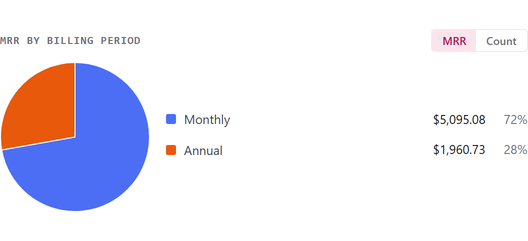
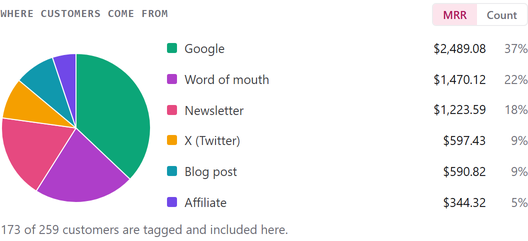
Two pies sit directly under the hero band. Each is worked out and stored at every sync; the page never calculates them on the spot. A pie with nothing to chart still draws a light gray circle rather than disappearing.
| Pie | What it shows | How it is computed |
|---|---|---|
| MRR by billing period | A toggle between MRR and Count, showing what share of MRR (or how many subscriptions) bill on each cadence. | Active-status subscriptions (active, trialing, past due) grouped by billing cadence and labeled Monthly, Quarterly, Half-yearly, Annual, or "every N day(s)". MRR per bucket follows the same contributing rule as the headline; ordered MRR descending. |
| Where customers come from | A toggle between MRR and Count, by the referral source picked for each customer in the customer drawer. | Customers tagged with a referral source who hold an active-status subscription. Top 6 sources are kept and the rest merged into "Other". Recalculated at each sync, and straight away whenever a referral source is saved. |
A caption under the referral pie states how many tagged customers are shown, for example "X of Y customers are tagged and included here."; when nobody is tagged it links "Tag customers in the Customers report." Both pies are in the free plugin.
Period and Compare control (drives What changed and Churn & retention)
Above the "What changed" and "Churn & retention" bands sits one shared control row: Period (your saved preset, or Last 12 months), with the dates it covers beside it, for example "Oct 19, 2025 – Oct 19, 2026", then Compare to, with the comparison window's dates beside it. This is a separate control from the hero's own Compare to picker.
See Comparison periods for every option and how each is resolved, and Date ranges, grouping, sorting and search for how the Period presets themselves work.
What changed
Head: What changed, tagged "Over a period", with a "View report" link to Revenue and MRR using the same range.
| Card | What it shows | How it is computed |
|---|---|---|
| Cash collected | "The actual money received in this period (all successful charges minus refunds), including one-off and annual payments. This is cash in the door, not recurring run-rate." | Succeeded payments dated in the period, net of refunds, primary currency only. The line under it splits new versus returning customers. |
| New customers | "Customers whose first-ever payment landed inside this period." | Distinct customers whose first successful payment falls inside the period, all currencies. |
| Cancellations | "Subscriptions that cancelled in this period, split into voluntary (chose to leave) and involuntary (failed payment)." | Subscriptions whose cancellation date falls inside the period. Involuntary means the cancellation reason was a failed or disputed payment, or the subscription went past due or unpaid in the 30 days before it was cancelled; voluntary is the rest. |
| New Customers MRR | "The monthly recurring revenue added by new subscriptions that started in this period. It is a per-month figure and excludes one-off sales, so it is much smaller than new cash collected." | The New column of the Revenue and MRR report, added up over the period: the starting monthly amount of subscriptions that started in the period and are not reactivations. |
All four cards show the change against the Compare to window. For Cancellations, a fall shows as good news.
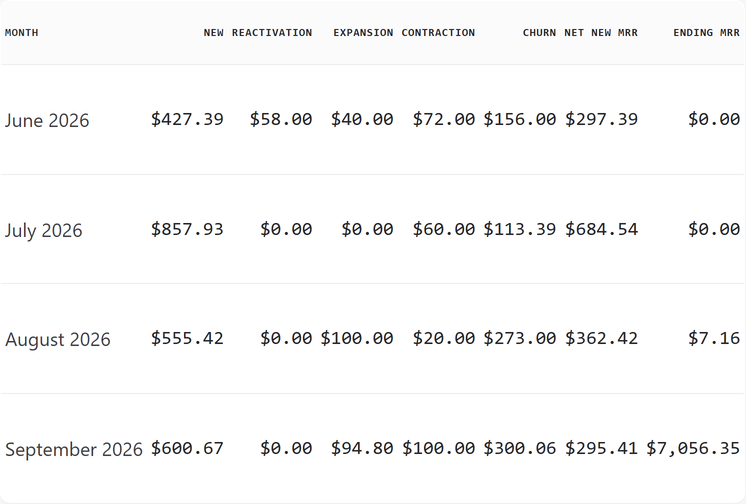
A row below the cards, labeled MRR movement, has five cards: Reactivation, Expansion, Contraction, Churn and Net new MRR. A line under them reads "Net new MRR = New Customers MRR + Reactivation + Expansion − Contraction − Churn". Expansion and Contraction come only from plan changes SadAnalytics has recorded, so a change made before SadAnalytics started recording them does not show here.
Churn & retention
Head: Churn & retention, tagged "Over a period", with a "View report" link to the Subscriptions report with Cancelled ticked and the same date range. That report applies the range to start dates, not cancellation dates, so its list will not match this band exactly.
| Card | What it shows | How it is computed |
|---|---|---|
| Voluntary churn | "The share of subscribers who actively chose to cancel during the period." | Voluntary cancellations in the range, over subscriptions active at the range start. |
| Involuntary churn | "The share of subscribers lost to failed payments during the period." | Involuntary cancellations in the range, over the same denominator. |
| MRR churn | "The share of monthly recurring revenue lost to cancellations during the period." | The monthly amount of subscriptions cancelled in the range, over the MRR of the subscriptions active at the range start, primary currency only. |
Every rate is shown to 2 decimals, and as an em dash when no subscription was active at the range start. Subscriptions that both started and cancelled inside the range are left out of the count, so a rate cannot exceed 100%. The Compare to choice never changes this band.
Upcoming payments
Head: Upcoming payments, tagged "Looking ahead", with its own forward range picker (Next 7 days, Next 30 days by default, Next 90 days, or custom dates) and a "View report" link. In the free plugin that link opens a locked page, because the Upcoming Payments report will come with SadAnalytics Pro.
| Card | What it shows | How it is computed |
|---|---|---|
| Renewals due | "How many active subscriptions are scheduled to renew in the selected window." | Count of active, trialing, past due or paused subscriptions not set to cancel at period end, whose current period ends inside the window, all currencies. |
| Expected renewal cash (SadAnalytics Pro, coming soon) | "Money expected from active subscriptions scheduled to renew in the selected window." | Sum of the per-renewal charge amount over the same subscriptions, primary currency only. |
Under this band, a What SadAnalytics Pro adds box appears when SadAnalytics finds activity that SadAnalytics Pro would handle, with a "See what Pro adds" link for each. Dismissing the first-sync panel hides this box too.
Trial to paid conversion
Head: Trial → paid conversion, tagged "Last 90 days" (this band has no period control), with a "View conversions" link to the Trial Conversions report.
| Card | What it shows | How it is computed |
|---|---|---|
| WordPress signup rate | Of the WordPress accounts in a trial role that signed up 30 to 90 days ago, the share that went on to make a successful payment. | Of WordPress users registered 30 to 90 days ago holding a selected trial role, the share matched to a customer with a succeeded payment on or after registration. An em dash when no trial role is selected, the site has over 50,000 users, or fewer than 10 such users exist. |
| Trial accounts | WordPress users in a trial role who signed up 30 to 90 days ago, whether or not they went on to pay. | All matching users, converted or not. The signup rate is Converted to paid divided by this number. |
| Converted to paid | Of those trial accounts, the ones that went on to make a successful payment. | The matching users linked to a customer with a succeeded payment on or after registration. |
| Provider trial rate | "The share of native payment-provider trials that converted into paying subscriptions." | Across all providers, native trials whose trial end fell in the last 30 days, the share with a succeeded payment after the trial end. An em dash when fewer than 10 trials. Refunded trial payments still count as conversions. |

MRR over time
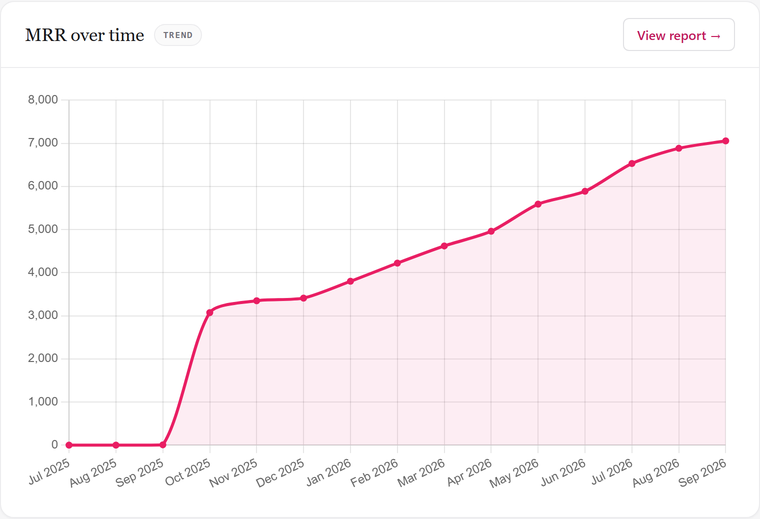
Head: MRR over time, tagged "Trend", with a "View report" link to Revenue and MRR. This band has its own scope and is not affected by the Period control above it.
The line plots combined MRR across active providers, one point per month, on an axis that starts at zero, with no legend. Each sync rebuilds the last 12 months; months saved by earlier syncs stay on the line, so it can run longer than a year. With fewer than 2 points the chart is hidden and the text "Not enough history yet. The trend fills in as months are synced." shows instead.
Footer: last synced
When the latest sync job is in a terminal state (completed, failed or cancelled) and has a completion time, the footer reads "Last synced · Sync schedule: .", converted to the site timezone. The schedule label is one of "Every 6 hours", "Every 12 hours", "Daily" (default) or "Manual", as set on the Data Sync settings tab.