Paid Memberships Pro connector
In SadAnalytics Pro, the PMPro connector will bring offline and bank-transfer revenue recorded in Paid Memberships Pro into SadAnalytics, alongside your Stripe data. This page describes how it works, so you know what to expect.
Detecting Paid Memberships Pro
SadAnalytics detects Paid Memberships Pro when it defines its PMPRO_VERSION constant or its MemberOrder class exists; no credentials are involved.
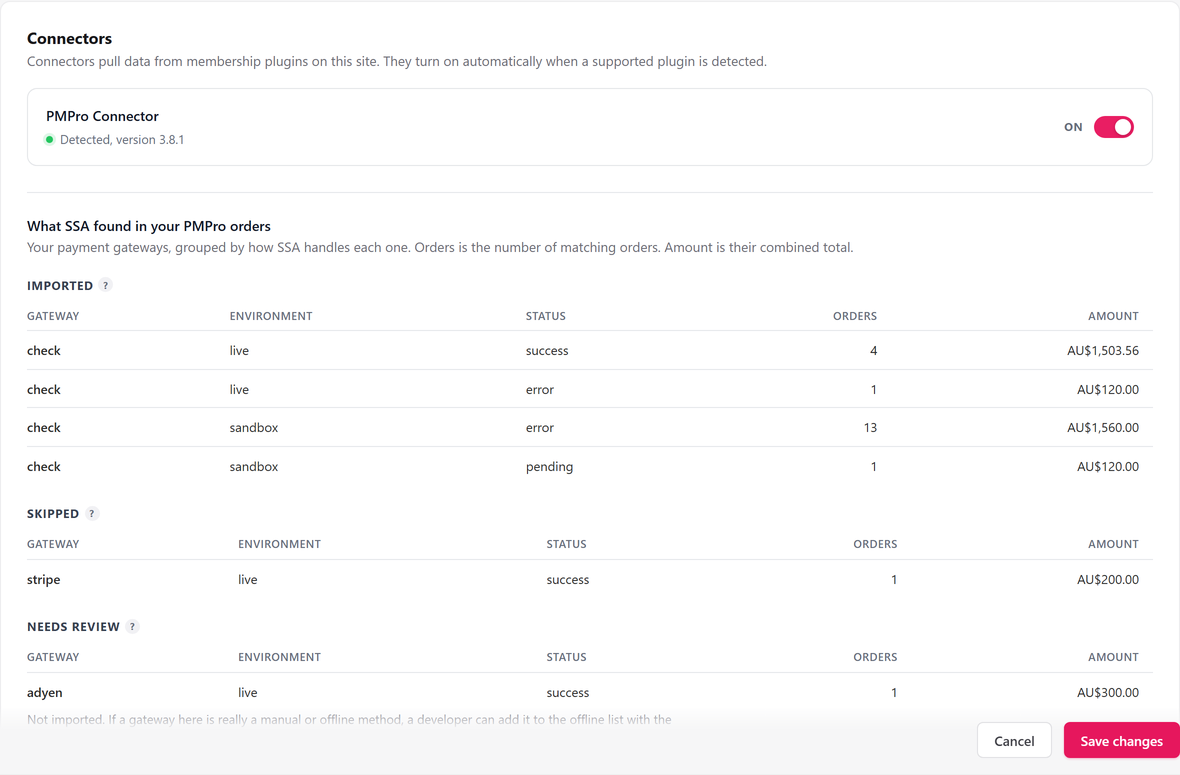
With SadAnalytics Pro active, Settings, Connectors shows a detected install with a green dot and its version, for example "Detected, version 3.1", plus an on/off switch. When PMPro is not installed the row reads "Not installed" and shows no switch.
Enabling the connector
A detected connector is on by default. Switching it on registers the PMPro provider and starts a full sync of its data right away.
Switching it off stops new imports. Nothing is deleted and those customers stay in your lists, but while it is off the Dashboard's MRR leaves PMPro out.
What is imported, and what is not
SadAnalytics groups every PMPro order by its payment gateway:
- Imported: orders with no gateway recorded, or gateway "check" (PMPro's pay-by-check option). Those two are the default offline set.
- Skipped: orders from card processors such as Stripe, PayPal or Braintree. Stripe money already comes in through SadAnalytics' Stripe connection, so these are left out to avoid counting it twice. SadAnalytics does not read PayPal or the others yet, so that revenue is not counted.
- Needs review: orders from a gateway SadAnalytics does not recognize. Not imported; a developer can add an offline gateway to the allowed list with the
sadanalytics_pmpro_offline_gatewaysfilter.
Status mapping
| PMPro membership state | Status in SadAnalytics |
|---|---|
| A membership PMPro reports as active | Active |
| A membership PMPro has ended or cancelled | Cancelled |
| An active membership overdue past the grace period (60 days by default) | Cancelled, reason "lapsed" |
PMPro memberships never arrive as trialing or paused; the connector only ever emits active or cancelled.
PMPro Offline in your reports
Imported records show up as an ordinary source named PMPro Offline, with its own colored mark on Customers, Subscriptions, Transactions and Upcoming Payments, and its own option in the Source filter on each of those lists.
The preview panel: what SadAnalytics found in your PMPro orders
The Connectors tab also shows What SadAnalytics found in your PMPro orders: every order in PMPro, grouped by gateway into the same Imported, Skipped and Needs review buckets, with a count and total for each.
This preview is a full, unfiltered census, so it can list orders in test mode or a failed state that the real import does not actually take. Treat it as a guide to your gateways, not an exact preview of what will be imported.
The double-count guard with manual entry
While the PMPro connector is importing, the Manual Payments page is hidden altogether, so the same bank transfer or check cannot be entered twice. Switching the connector off brings Manual Payments back.
If Paid Memberships Pro is installed but the connector is off, Manual Payments works as normal. Turn the connector on if you would rather import those payments than type them in.
The overdue rule in Upcoming Payments
Upcoming Payments (also part of SadAnalytics Pro) lists a PMPro Offline subscription by its expected renewal date, estimated from PMPro's own next-payment date or, failing that, from its last successful payment plus one billing interval.
A late PMPro renewal keeps showing, marked overdue, until it passes the grace period (60 days by default), at which point SadAnalytics treats it as lapsed and it drops off the list.