Settings: Connectors
A connector pulls subscription data from a membership plugin already installed on your site, such as Paid Memberships Pro, so it counts alongside anything Stripe reports. SadAnalytics itself reads only Stripe; connectors come with SadAnalytics Pro.
Where to find it, and what it shows today
Go to Settings → Connectors, at admin.php?page=sad-subscription-analytics-settings&tab=connectors.
Without SadAnalytics Pro, the list reads No connectors are available yet. If SadAnalytics finds Paid Memberships Pro on your site, it adds one row, Offline PMPro payments, marked Detected. Import automatically with SadAnalytics Pro, with a Get SadAnalytics Pro button that links to the pricing page on sadanalytics.com. Nothing is imported from Paid Memberships Pro in the free plugin.
The connector list (SadAnalytics Pro, coming soon)
With SadAnalytics Pro, the list will have one entry, the PMPro Connector for Paid Memberships Pro, and the Offline PMPro payments row above goes away. The connector turns on by itself when Paid Memberships Pro is detected. Each row shows the connector's name and a status.
| Row state | What it means |
|---|---|
| Not installed (em dash, no toggle) | The host plugin (for example Paid Memberships Pro) is not present on this site. |
| Detected, version X (with an On/Off toggle) | The host plugin was found. The connector is on by default; the toggle only records which ones you have explicitly switched off. |
Turning a detected connector on starts a full sync for that connector's data only. Turning it off only records the preference; it does not delete any data already imported.
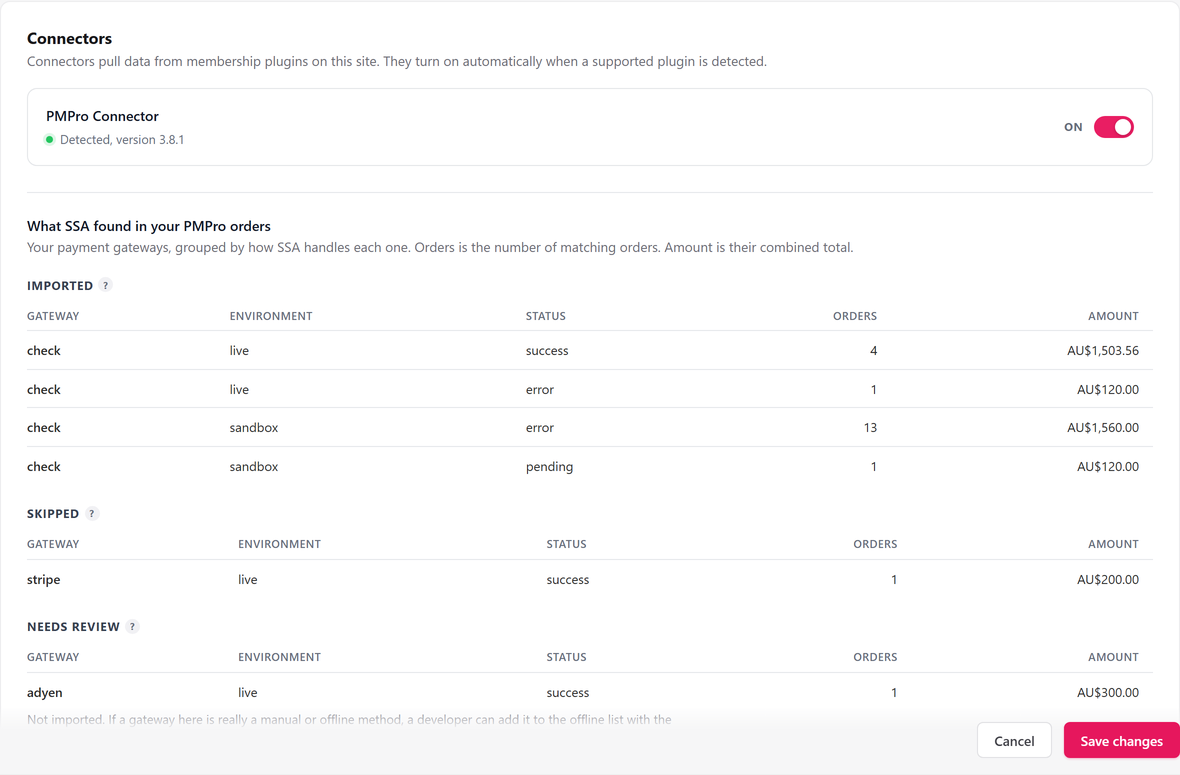
What SadAnalytics found in your PMPro orders (SadAnalytics Pro, coming soon)
With SadAnalytics Pro, below the connector list, a preview panel titled What SadAnalytics found in your PMPro orders groups every payment gateway your Paid Memberships Pro install has ever recorded, so you can see what a sync would do before it runs. Its description reads: Your payment gateways, grouped by how SadAnalytics handles each one. Orders is the number of matching orders. Amount is their combined total.
| Group | What lands here |
|---|---|
| Imported | Payment methods recorded outside a card processor, such as a manually recorded transfer or an admin-added order, because no other connected source already covers them. |
| Skipped | Payments taken by a card processor, such as Stripe or PayPal. Stripe payments already reach SadAnalytics through its Stripe connection, so importing them here would count them twice. SadAnalytics does not read the other processors yet. |
| Needs review | Any gateway SadAnalytics does not recognize. Nothing here is imported. If it is a manual or offline method, a developer can add it to the offline list; if it is a card processor, you can leave it. |
Each group's table lists Gateway, Environment, Status, Orders and Amount. The panel shows every environment (live and sandbox alike) so you can see the full picture, but only live-environment orders in the Imported group are ever actually brought in. When PMPro has no payment orders at all, the panel reads: No payment orders found in PMPro yet.
What saving does
The Connectors tab does not use the sticky Save changes bar. With SadAnalytics Pro, flipping a connector's On/Off toggle posts immediately; there is nothing to save afterward. The preview panel is read-only and never writes anything on its own.