Payment Recovery
Payment Recovery lists invoices that needed a retry, and whether the payment was eventually recovered. Only sources that report retry data feed it; today that is Stripe.
What the report answers
Which invoices needed more than one payment attempt, and did the money come back? The population is every invoice with more than one attempt whose invoice date falls in the range; a single-attempt invoice, paid or not, never appears. "Recovered" is derived at sync time the same way for every source: more than one attempt and status paid, regardless of what the provider itself says about recovery.
The Paid Memberships Pro connector (SadAnalytics Pro, coming soon) stores its pending offline orders with an attempt count of 1, so none of them will reach this report, and manual payments (also SadAnalytics Pro) produce no invoices at all. That is what "Reflects providers that report retry data." means in practice: Stripe is the report's real source today.
Summary cards
| Card | What it shows |
|---|---|
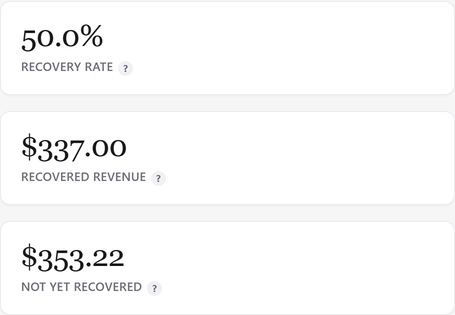
| Recovery rate | Of the invoices in the selected range that needed a retry, the share that were paid in the end. Recovered invoices divided by all retried invoices in the range, times 100, to one decimal; an em dash when there are no retried invoices in the range. |
| Recovered revenue | Money collected on invoices in the selected range that failed at first and were paid later: the amount paid on invoices flagged recovered, converted to the primary currency. |
| Not yet recovered | "Money from failed payments that is still unpaid and not yet recovered." Amount due minus amount paid on retried invoices whose status is open, converted to the primary currency. |
All three cards follow the date range you pick.
Filters
| Field | What it does |
|---|---|
| Date range | Filters on the invoice date. Backward presets, default Last 12 months or the saved preset. On screen: "see Date ranges, grouping, sorting and search" |
| Search | Matches the customer's email only (contains match). On screen: "Search" |
There are no filter chips at all on this report.
Columns
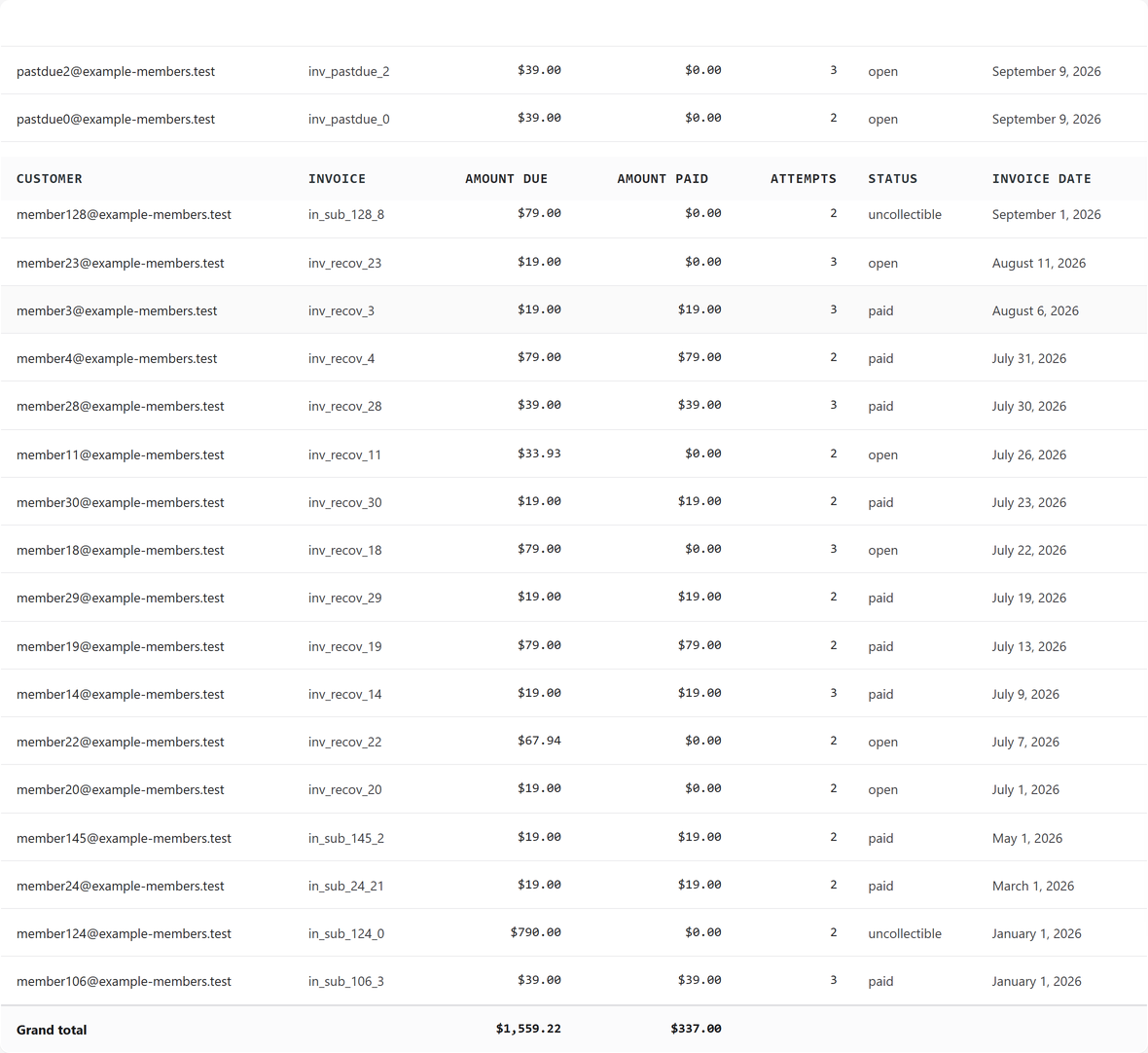
| Column | What it is |
|---|---|
| Customer | Opens the customer drawer; shows the customer's email. |
| Invoice | The provider's own invoice id, plain text. |
| Amount due | Money, summable. |
| Amount paid | Money, summable. |
| Attempts | Whole-number payment attempt count. |
| Status | The invoice status word exactly as the source supplied it, lower-case (for Stripe, values such as "paid" or "open"), with no label mapping or pill. |
| Invoice date | The date the invoice was raised. |
Sorting and grouping
Invoice date, Amount due and Amount paid are sortable; the default order is invoice date, newest first. Group by offers only "Month": a collapsed accordion by invoice month, newest first, totaling Count, Amount due and Amount paid per month.
The drawer
The Customer cell opens the customer drawer, with lifetime value, active subscriptions and payment history. See Customers and the customer drawer for its full contents.