Customers and the customer drawer
The Customers report lists every customer SadAnalytics has seen pay or subscribe, one row per customer. Clicking a customer opens the same customer in a side drawer, with more detail than the table can show.
What the report answers
Registered as the Customers submenu, it is the first of four leaves under the Customers tab: Customers, Subscriptions, Transactions, Trial Conversions. Its sub-line reads: "Every customer who has ever paid: active, past due, paused, cancelled."
Every administrator can open it, and nobody else can. Choosing exactly who can see SadAnalytics, including view-only access, will come with SadAnalytics Pro.
Summary cards
| Card | What it counts |
|---|---|
| New in range | Customers matching the active filters whose first payment date falls inside the selected date range. |
| Active | Customers whose latest subscription is active, trialing or past due, counted across all dates and scoped by the active filters. |
| Unmatched | Customers with no linked WordPress user account, counted across all dates. The figure is a link back to this same list, showing that exact set. |
| Total, all dates | Every customer matching the active filters, regardless of the date range. Not the whole-site total once a filter is applied. |
Only "New in range" moves with the date range; the other three cards look across all dates. Cards are cached for ten minutes and refresh after every sync and after any change made in the drawer.

Filters
| Field | What it does | Default |
|---|---|---|
| All customers | Whether the customer has ever had a subscription (Subscribers), never had one (One-time), or has no matched WordPress account (Unmatched). | All customers (no filter) |
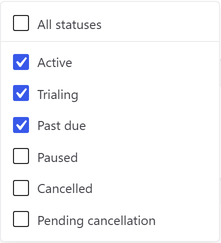
| All statuses | A checkbox dropdown: tick any combination of Active, Trialing, Past due, Paused, Cancelled and Pending cancellation. An empty selection means every status. Pending cancellation is a real derived rule here: the customer's latest subscription must already be set to cancel at period end, with a future cancellation date, and must not be cancelled yet. | All statuses (nothing ticked) |
| All plans | Matches customers who have ever held a subscription with that plan name, not only their current one. | All plans |
| All sources | Where the customer's own record came from. In the free plugin this is Stripe; Paid Memberships Pro and Manual will come with the SadAnalytics Pro add-on (coming soon). | |
| All sources | The referral source you picked for the customer in the drawer, from the list you set in Settings > General, plus a final (none) option for customers with nothing recorded. Uses the same placeholder text as the source filter above, so the two menus read alike until opened. A value later removed from the referral list still matches customers already tagged with it. | |
| Search | Matches the customer's email address only; searching by name is not supported. Typing pauses briefly before the list reloads. | empty |
Columns
| Column | What it shows |
|---|---|
| Customer | The email address, as a button that opens the drawer. |
| Status | A colored pill from the customer's latest subscription. See every status explained in the glossary. |
| Plan | The latest subscription's plan name. |
| Source | A small colored mark for the provider the record came from. |
| MRR | The latest subscription's monthly amount, when that subscription counts toward MRR. A customer with two contributing subscriptions is undercounted here by design, because only the latest one is read. |
| LTV | All of the customer's successful payments, net of any refund, summed across all time. Not sortable. |
| Signed up | The latest subscription's start date. This is not the date the customer record itself was created. |
| Referral source | The referral source picked for the customer in the drawer. |
See every status, explained for what Active, Trialing, Past due, Paused, Cancelled and Pending cancellation mean.
Sorting and grouping
Only Customer and Signed up are sortable; LTV is deliberately left out. With no sort applied, the newest customer record comes first.
- Group by Status, Plan / product, Source or Referral source.
- Each group gets a header row, a subtotal for MRR, and a grand total at the end.
- Group headers for Status and Source show the raw stored value (for example "past_due" or "stripe"), not the friendly pill label shown in the table itself.
- Subtotals and the grand total cover only the twenty-five rows on the current page, not the whole filtered list.
The drawer
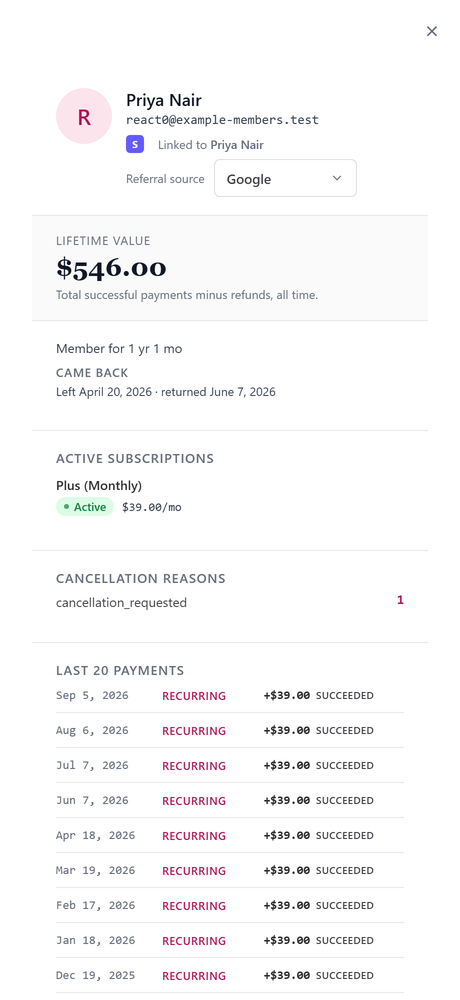
Clicking a customer, on this page or on Subscriptions, Transactions, Trial Conversions, Reactivations or Payment Recovery, opens the same drawer. In the free plugin every administrator can read it and use the actions below. With SadAnalytics Pro's view-only access (coming soon), a view-only user will be able to read it but not change anything.
- A header with the linked WordPress account (or a note that none is matched) and a menu for picking the customer's referral source.
- Lifetime value: total successful payments minus refunds, all time.
- How long the customer has stayed, plus any risk signals: currently past due, a scheduled cancellation date, or failed payments in the last 90 days.
- A list of dates the customer left and came back, when that has happened.
- Active subscriptions: every subscription that is not cancelled. One SadAnalytics worked out on its own, from at least three recurring charges the provider never modeled as a subscription, carries a "Detected" badge and two buttons, Confirm as subscription and Mark as one-time.
- Cancellation reasons: a rollup of the stored reason codes across the customer's cancelled subscriptions.
- Last 20 payments, newest first, net of any refund.
- Footer links to the matched WordPress account and to the customer's record with the connected provider.
Confirming a detected subscription turns it into an ordinary one. Marking it as one-time deletes it, returns its payments to one-off, and writes a permanent note so a later sync will not detect the same pattern again.