Subscriptions and every status
The Subscriptions report lists one row per subscription: reported by a provider, worked out by SadAnalytics from a run of matching charges, or entered by hand (SadAnalytics Pro, coming soon).
What the report answers
It sits second in the Customers tab group. The range filters on the subscription's own start date, defaulting to the last 12 months, and rows come newest-started first.
Summary cards
| Card | What it counts |
|---|---|
| Subscriptions | Of the subscriptions that started in this range, how many are still active today (counting trialing and past due), not cancelled. |
| Started new | Subscriptions that started in this range. |
| Cancelled | Of the subscriptions that started in this range, how many have since cancelled. |
| MRR | Monthly recurring revenue from the subscriptions that started in this range and are still active. Not your total MRR. |
Filters
| Field | What it does | Default |
|---|---|---|
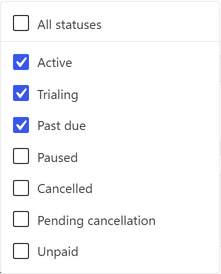
| 3 statuses | A checkbox dropdown listing Active, Trialing, Past due, Paused, Cancelled and Unpaid. Tick All statuses to also see Paused, Cancelled and Unpaid rows. | Active, Trialing and Past due ticked, the current subscriber population |
| All plans | Matches the subscription's own plan name exactly. | All plans |
| All sources | Matches the subscription's own provider. In the free plugin this is Stripe. | All sources |
| Search | Matches the customer's email address or the subscription's plan name. | empty |
See every status, explained for what Active, Trialing, Past due, Unpaid, Paused and Cancelled mean.
Columns
| Column | What it shows |
|---|---|
| Customer | The matched WordPress display name, else the stored name, else the email. |
| Plan | The subscription's plan name. |
| Source | The connected provider it came from. |
| Status | A colored pill from the stored status; see every status explained in the glossary. |
| MRR | The stored monthly amount, or zero when it is null. |
| Started | The subscription start date. |
| Next renewal | The current billing period's end date. |
| Cancelled | The cancellation date, when there is one. |
| Tenure | How long the subscription has run, in whole days, months and years. |
Nothing in this table marks a row as detected rather than native; that distinction only shows in the customer drawer.
Sorting and grouping
Started, MRR, Status and Plan are sortable.
- Group by Plan / product, Status, Source, Billing interval or Tenure.
- Billing interval reads the subscription's day count and labels each group Monthly, Quarterly, Half-yearly, Annual, or "every N days".
- Tenure groups into fixed bands: Under 3 months, 3-6 months, 6-12 months, 1-2 years, 2 years+, and Unknown when the start date is missing. Each band shows a count and an MRR total for the whole band, not just the current page.

The drawer
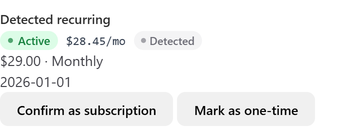
Clicking a customer name here opens the same drawer described under Customers and the customer drawer, including the Confirm and Mark as one-time buttons on any detected subscription.