Settings: Email Digest
The Email Digest tab turns on a weekly summary email of your key subscription numbers and controls who gets it and when. Two buttons let you send a real test copy or preview it on screen without mailing anything.
Where to find it
Go to Settings → Email Digest, at admin.php?page=sad-subscription-analytics-settings&tab=digest.
Email Digest fields
| Field | What it does | Default |
|---|---|---|
| Email Digest | The on/off toggle for the whole feature, next to the card heading. On screen: "Receive a weekly summary of your subscription metrics delivered straight to your inbox." Boolean. | Off. |
| Recipient emails | Who receives the digest. On screen: "Comma-separated email addresses. Only the addresses listed here receive the digest." Split on commas or spaces; each entry checked with a real email test, invalid ones dropped silently, duplicates removed case-insensitively. | Seeded with the WordPress admin email on activation, but it is a stored, deletable value; only what is actually saved here ever gets mailed. |
| Send day | The day of the week the digest goes out, in your site timezone. On screen: "Day of the week on which the digest is sent." A value outside Monday through Sunday falls back to Monday. | Monday. |
| Send hour (site timezone) | The hour of day the digest is dispatched. On screen: "Time of day (site timezone) when the digest email is dispatched." A value outside 00:00 through 23:00 falls back to 08:00. | 08:00. |
When Email Digest is on and Recipient emails is empty, a warning shows in the card: Enter at least one email address to receive the digest. It does not block saving; it is a reminder, re-checked as you type.
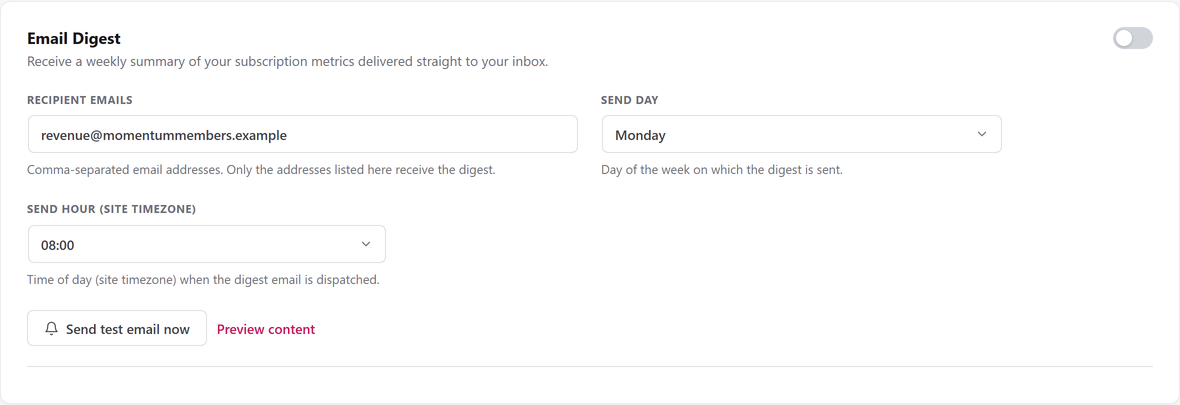
Send test email now and Preview content
Send test email now mails the real digest, built from live data, to whatever is currently SAVED in Recipient emails, not to unsaved text still in the box. Save your changes first if you have just edited the list. It goes to every saved address exactly as the weekly send does (the first address in To:, the rest as Bcc), and it works even while Email Digest is switched off.
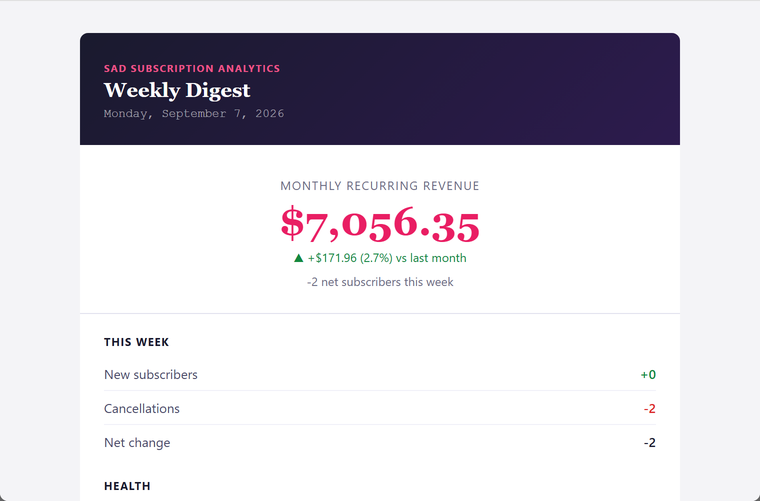
Preview content opens the same live digest in a pop-up window, titled Digest Preview, without sending anything or checking whether any recipient is saved. It rebuilds the email fresh every time you press it.
What saving does
All four fields on this tab are saved by the sticky Save changes bar shared across the Settings page. Send test email now and Preview content are separate, immediate actions and do not go through Save changes at all.
The digest schedule is only recreated when Send day, Send hour or the Email Digest toggle actually changed; saving Recipient emails alone does not reschedule anything.