Real MRR for a WP Simple Pay site.
WP Simple Pay creates Stripe subscriptions and one-time payments. SadAnalytics reads both with a read-only key, separates recurring from one-off, and shows the recurring side as MRR, churn and retention.
What WP Simple Pay shows you today
Payment forms, a payments list, and an activity report of gross volume and successful payments. It does not show MRR, monthly churn or retention. Stripe's Billing analytics does, but outside WordPress and away from your WordPress users.
How SadAnalytics reads it
WP Simple Pay creates a Stripe subscription for each recurring payment form. SadAnalytics reads customers, subscriptions, charges, invoices and prices from Stripe with a restricted key and matches each Stripe customer to their WordPress user by email.
What you get
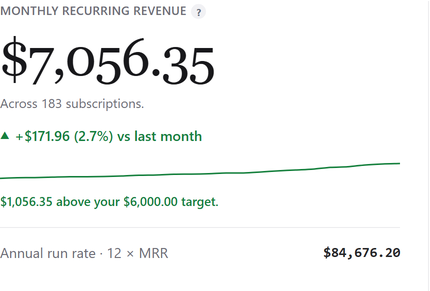

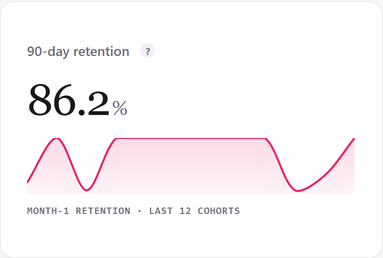
Three steps
-
1
Install the plugin
It is in review at WordPress.org. Once it is listed, go to Plugins, Add New Plugin, search for Sad Subscription Analytics, then Install Now and Activate.
-
2
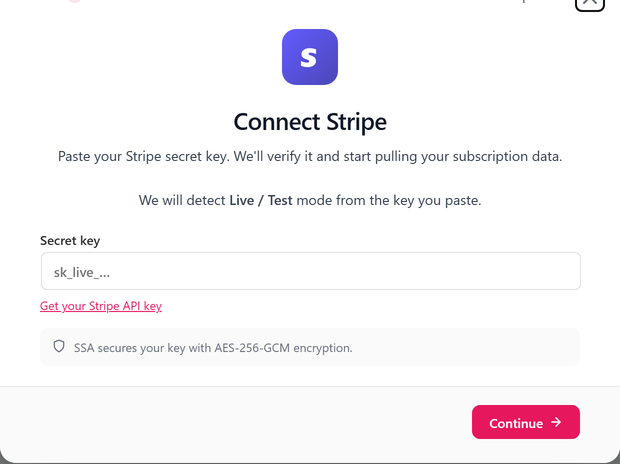
Paste a read-only Stripe key
Read access to customers, subscriptions, charges, invoices and prices. Add products too if you want plan names.
-
3
Run the first sync
It runs in the background, and your dashboard fills in as it goes.

WP Simple Pay questions
Do one-time payments count?
They show in Transactions and in revenue, apart from MRR, which only counts recurring subscriptions.
Does SadAnalytics see coupons?
Yes. MRR uses the discounted amount while a forever or repeating coupon is active. A coupon that applies only once lowers that one payment, not MRR. Payments show what Stripe actually charged.
Do I need WP Simple Pay Pro?
No. SadAnalytics reads Stripe, whichever WP Simple Pay version created the subscription.
See your real recurring revenue.
The free plugin is in review at WordPress.org. SadAnalytics Pro is coming soon. Want to know when it is out? Email [email protected].