Recurring revenue from Payment Links, counted properly.
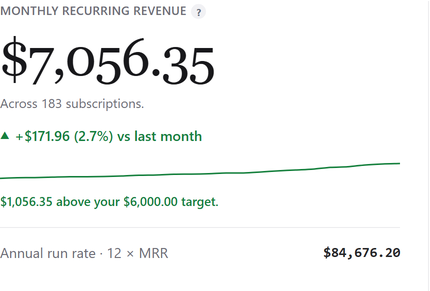
Recurring Payment Links create real Stripe subscriptions; one-time links create charges. SadAnalytics reads both and shows the recurring side as MRR, churn and retention, with one-time sales kept apart.
What Stripe Payment Links shows you today
Stripe's own dashboard lists your payments and subscriptions, and its Billing analytics shows MRR, churn and cohort retention. All of it lives inside Stripe, away from your WordPress users, and it does not count a one-time link someone pays every month as recurring revenue.
How SadAnalytics reads it
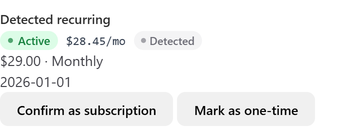
Recurring Payment Links create Stripe subscriptions, which SadAnalytics reads directly. One-time links create charges, which show in Transactions. If a customer pays a one-time link at a regular interval, SadAnalytics detects the pattern, from the third charge onward, and counts it as a detected subscription.
What you get

Three steps
-
1
Install the plugin
It is in review at WordPress.org. Once it is listed, go to Plugins, Add New Plugin, search for Sad Subscription Analytics, then Install Now and Activate.
-
2
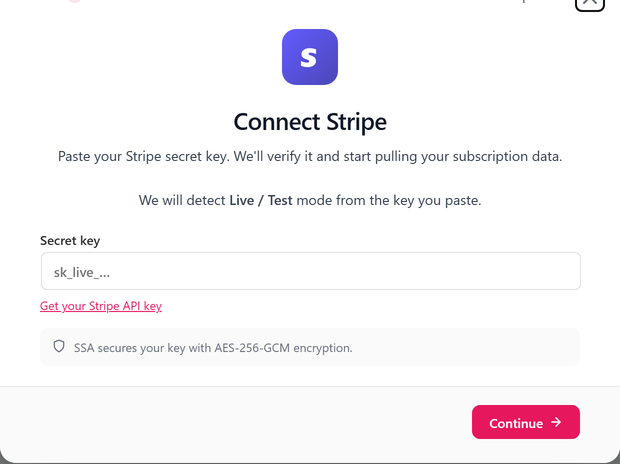
Paste a read-only Stripe key
Read access to customers, subscriptions, charges, invoices and prices. Add products too if you want plan names.
-
3
Run the first sync
It runs in the background, and your dashboard fills in as it goes.

Stripe Payment Links questions
Do I need a WordPress plugin for Payment Links at all?
Only for the reports. Payment Links keep working exactly as they do; SadAnalytics reads Stripe and shows the numbers inside wp-admin.
Are customers matched to WordPress users?
By email, when a WordPress user with the same address exists.
Which key permissions?
Read access to customers, subscriptions, charges, invoices and prices. Products is optional; it gives SadAnalytics your plan names.
See your real recurring revenue.
The free plugin is in review at WordPress.org. SadAnalytics Pro is coming soon. Want to know when it is out? Email [email protected].