Churn Rate
You can spend all your energy getting new members. But if they’re leaving out of the back door just as fast, you’re stuck on a treadmill going nowhere. That’s why churn rate matters. It tells you how many members you’re losing and forces you to ask the uncomfortable question: why are they leaving?
Don’t be sad if your churn rate is higher than you expected. Most membership site owners don’t even know their number. Just knowing it puts you in a better position to fix it.
What is Churn Rate?
Churn rate is the percentage of subscribers who cancel their membership during a given period. Usually measured monthly.
If you start the month with 100 members and 5 cancel before the month ends, your monthly churn rate is 5%.
Simple enough on the surface. But churn is one of those metrics that can quietly destroy a membership business if you’re not watching it closely.
How to Calculate Churn Rate
The basic formula is:
Churn Rate = (Customers lost during period ÷ Customers at start of period) × 100
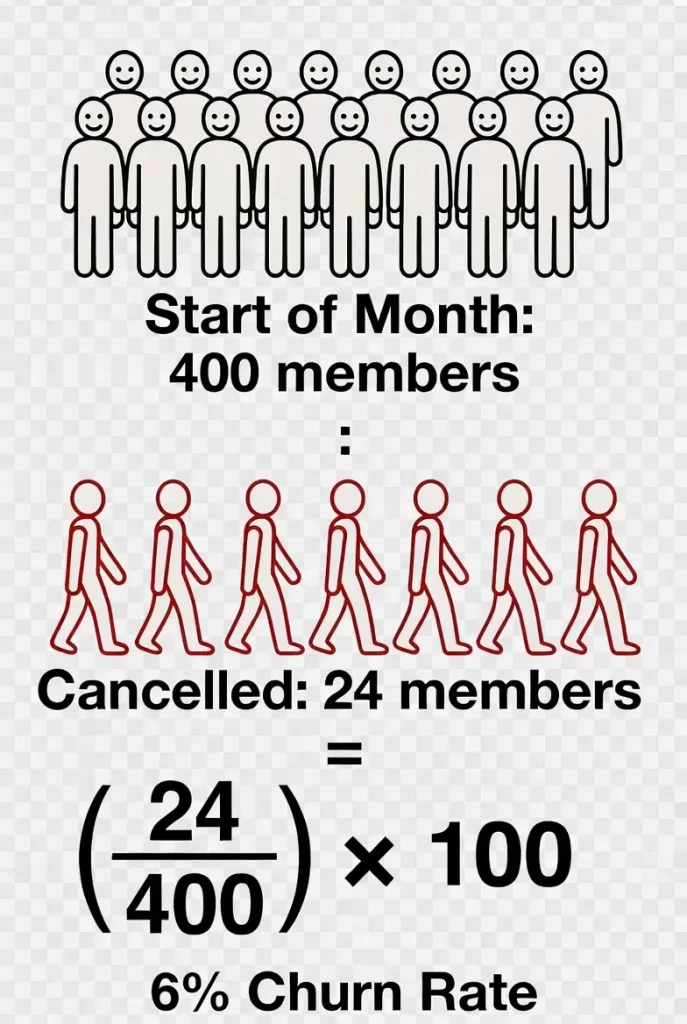
Let’s say Carlos runs a stock trading education site. He started March with 400 members. By March 31st, 24 members had cancelled.
His churn rate: (24 ÷ 400) × 100 = 6%
That means Carlos loses about 6 out of every 100 members each month. Over a year, that adds up fast.
Monthly vs Annual Churn Rate
Most membership sites track monthly churn because it gives you faster feedback. But sometimes you’ll want to know your annual churn rate for planning and benchmarking purposes.
A common mistake is multiplying monthly churn by 12. That’s not quite right because churn compounds.
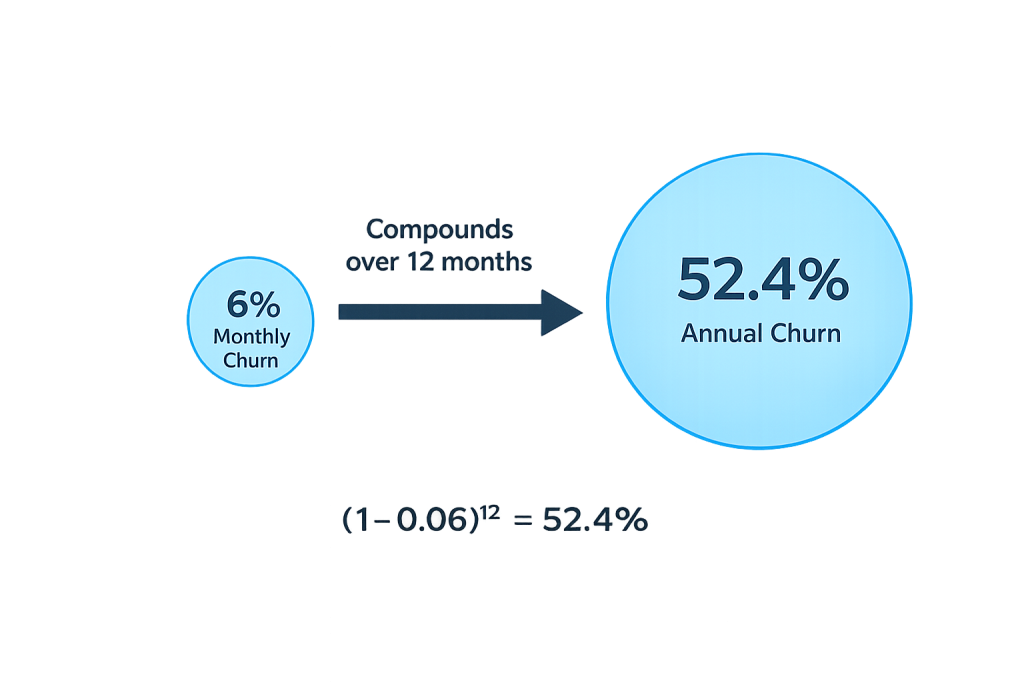
The accurate formula for converting monthly churn to annual churn is:
Annual Churn Rate = 1 – (1 – Monthly Churn Rate)^12
Using Carlos’s 6% monthly churn:
Annual Churn = 1 – (1 – 0.06)^12 = 1 – (0.94)^12 = 1 – 0.476 = 52.4%
That’s a reality check. A 6% monthly churn rate means Carlos will lose more than half his members over a year if nothing changes. Suddenly that “small” monthly number looks very different.
Why Churn Rate Matters for WordPress Membership Sites
Churn is the silent killer of membership businesses. Here’s why it deserves your attention:
It determines your growth ceiling. If you’re adding 20 new members per month but losing 25, you’re shrinking. Doesn’t matter how good your marketing is. You can’t outrun bad retention.
It affects lifetime value. The longer members stay, the more revenue they generate. High churn means low lifetime value, which limits how much you can spend to acquire new members.
It reveals product problems. Members don’t cancel for no reason. Rising churn often signals that your content isn’t meeting expectations, your community isn’t engaging, or competitors are offering something better.
It compounds over time. A small improvement in churn rate has massive long-term effects. Reducing monthly churn from 6% to 4% might not sound dramatic, but over a year that’s the difference between losing 52% of your members versus 39%.
Amy Porterfield, who runs multiple membership programs, has talked about how reducing churn was more valuable than any launch she ever did. One good retention strategy can be worth more than a dozen marketing campaigns.
The Two Types of Churn
Not all churn is the same. Understanding the difference helps you fix the right problems.
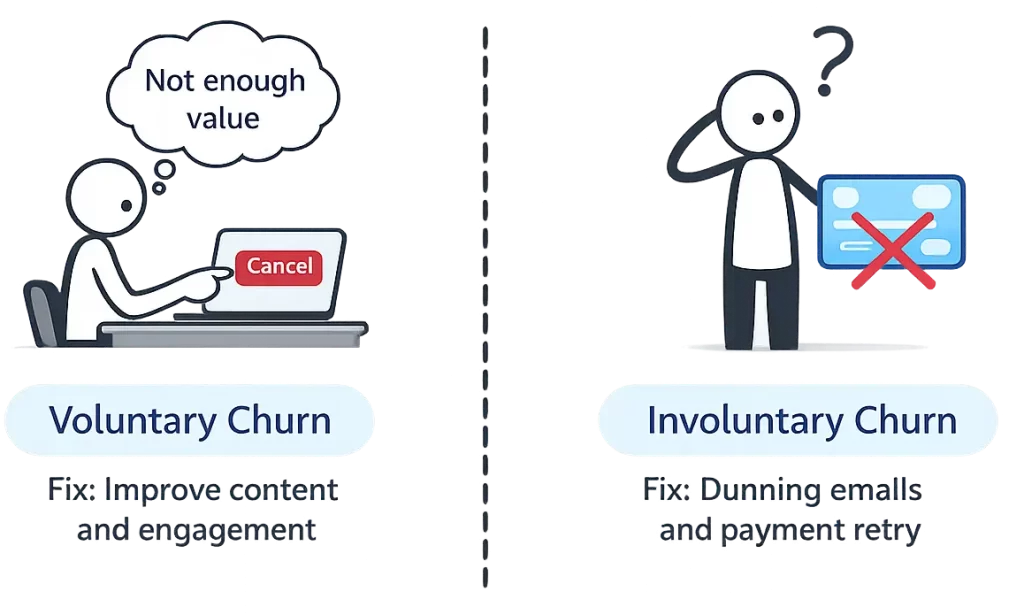
Voluntary churn happens when members actively decide to cancel. They log in, hit the cancel button, and leave. This usually means they didn’t see enough value, found an alternative, or no longer need what you offer.
Involuntary churn happens when members leave due to failed payments. Their credit card expired, got declined, or hit its limit. They didn’t choose to leave. They just fell through the cracks.
Here’s the good news: involuntary churn is often easier to fix. A solid dunning process (automated emails when payments fail) can recover 20-40% of failed payments. That’s members you would have lost for no good reason.
If you’re running MemberPress, Paid Memberships Pro, or WooCommerce Memberships connected to Stripe, you can set up automated retry logic and failed payment emails. It’s one of the highest-ROI fixes for any membership site.
What’s a Good Churn Rate?
Benchmarks vary by industry, price point, and audience. But here are some reference points for WordPress membership sites:
- Excellent: Under 3% monthly churn
- Good: 3-5% monthly churn
- Average: 5-7% monthly churn
- Concerning: 7-10% monthly churn
- Critical: Over 10% monthly churn
Keep in mind that newer membership sites typically have higher churn. You’re still figuring out your audience, refining your content, and building community. A 7% churn rate in year one might drop to 4% by year three as you improve.
Also consider your pricing. Lower-priced memberships ($5-15/month) tend to have higher churn because the barrier to both join and leave is low. Premium memberships ($50-200/month) often see lower churn because members are more committed and you’re likely providing more hands-on value.
Churn Rate vs Retention Rate
These two metrics are flip sides of the same coin.
Retention Rate = 100% – Churn Rate
If Carlos has 6% monthly churn, his retention rate is 94%. Both numbers tell you the same thing from different angles.
Some people prefer thinking in terms of retention because it’s a positive framing. “We retained 94% of our members” sounds better than “We lost 6% of our members.” Use whichever helps you and your team focus on improving.
Common Mistakes
Only tracking total churn. If you’re not separating voluntary from involuntary churn, you’re missing crucial information. The fixes are completely different. Lumping them together means you might be solving the wrong problem.
Measuring churn inconsistently. Pick a method and stick with it. Some people count cancellations when the member clicks cancel. Others count when the subscription actually ends. Either works, but mixing them makes trends meaningless.
Ignoring cohort differences. Your overall churn rate is an average. But members who joined during a Black Friday sale might churn at 12% while members from organic search churn at 4%. Cohort analysis reveals which acquisition channels bring members who actually stick around.
Panicking over monthly fluctuations. Churn rate will bounce around month to month. One bad month doesn’t mean your business is failing. Look at 3-month rolling averages to see the real trend.
Not asking why. A number without context is just a number. When members cancel, ask them why. A simple exit survey can reveal patterns you’d never notice otherwise. Maybe everyone’s leaving because they can’t find the content they want. That’s fixable.
How to Reduce Churn
Reducing churn is a topic that deserves its own deep-dive guide. But here are the high-impact strategies that work for most WordPress membership sites:
Nail your onboarding. The first 30 days are critical. Members who engage early are far more likely to stick around. Send a welcome sequence. Point them to your best content. Make them feel like they made the right choice.
Build community. Members who connect with other members have a reason to stay beyond just your content. A simple forum, Discord server, or Facebook group can dramatically improve retention.
Deliver consistent value. If you launched with a bang but haven’t added new content in three months, members will notice. Set a content schedule and stick to it.
Fix involuntary churn first. It’s the lowest-hanging fruit. Set up dunning emails in your membership plugin. Enable smart payment retries through Stripe. You can recover a significant chunk of otherwise lost members with minimal effort.
Offer annual plans. Members who pay annually churn at much lower rates than monthly subscribers. They’ve made a commitment. Incentivize annual billing with a discount and you’ll improve both cash flow and retention.
Real World Example
Let’s look at how churn affects a real business over time.
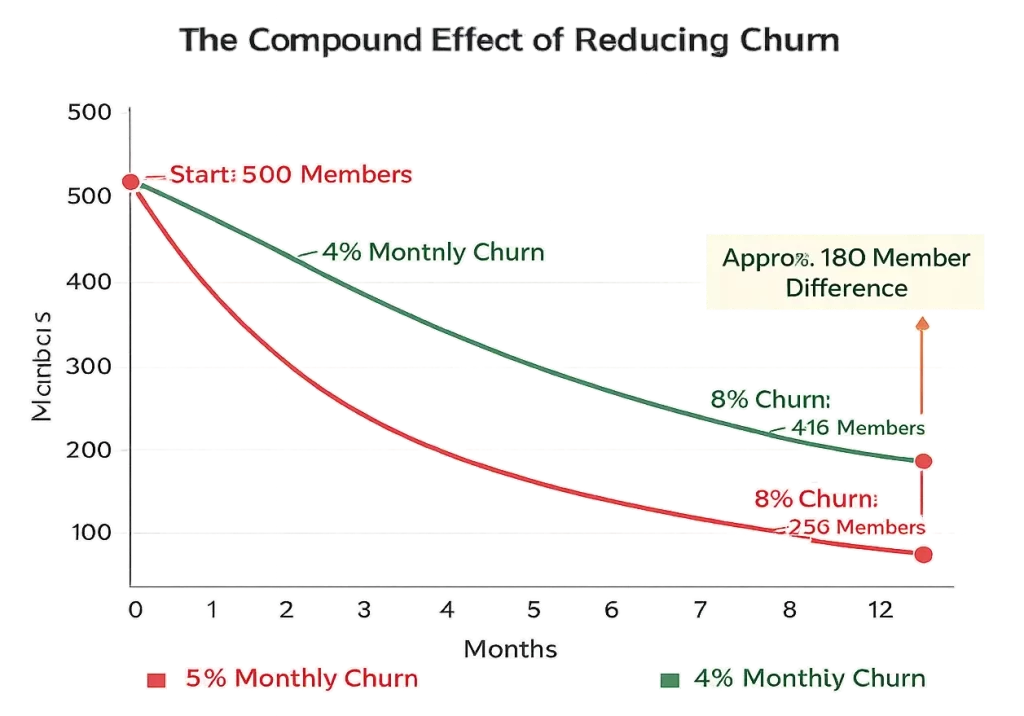
Priya runs a WordPress-based cooking membership site. She has 500 members paying $15/month. Her MRR is $7,500. Her current churn rate is 8% monthly.
At 8% churn, she loses 40 members per month. To just stay flat, she needs to add 40 new members every single month. That’s exhausting and expensive.
Priya decides to focus on retention. She implements a proper onboarding email sequence, adds a private Facebook group, sets up dunning emails for failed payments, and starts releasing new recipes every week instead of sporadically.
Six months later, her churn rate drops to 4%. Now she’s only losing 20 members per month. Those same marketing efforts that previously just kept her flat are now driving real growth.
After a year at 4% churn instead of 8%, Priya has 180 more members than she would have otherwise. At $15/month, that’s an extra $2,700 MRR. All from fixing the back door instead of just pushing more people through the front.
Track Your Churn Rate Automatically
Calculating churn manually is tedious. You have to pull cancellation data, cross-reference start dates, separate voluntary from involuntary, and do the math each month. Most membership site owners either do it inconsistently or skip it entirely.
We built Sad Subscription Analytics to track this for you. It connects to your payment provider, monitors cancellations in real time, and calculates your churn rate automatically. You’ll see the trend over time, broken down by churn type, without touching a spreadsheet.
No need to feel sad about your churn rate when you can actually see it, understand it, and start improving it. That’s the whole point.